# Tiktok

## title: TikTok description: How to add TikTok to your system[](https://docs.postiz.com/providers/tiktok#title-tiktokdescription-how-to-add-tiktok-to-your-system)

<div class="nextra-callout nx-overflow-x-auto nx-mt-6 nx-flex nx-rounded-lg nx-border nx-py-2 ltr:nx-pr-4 rtl:nx-pl-4 contrast-more:nx-border-current contrast-more:dark:nx-border-current nx-border-orange-100 nx-bg-orange-50 nx-text-orange-800 dark:nx-border-orange-400/30 dark:nx-bg-orange-400/20 dark:nx-text-orange-300" id="bkmrk-%F0%9F%92%A1"><div class="nx-select-none nx-text-xl ltr:nx-pl-3 ltr:nx-pr-2 rtl:nx-pr-3 rtl:nx-pl-2">💡</div><div class="nx-w-full nx-min-w-0 nx-leading-7">  
</div></div>This integration requires that you have a TikTok developer account. It also requires that you have a public website, with https, and can upload files to that site to verify ownership.

TikTok will also not allow http:// for your app redirect URI, so you will need to be accessing Postiz from HTTPS.

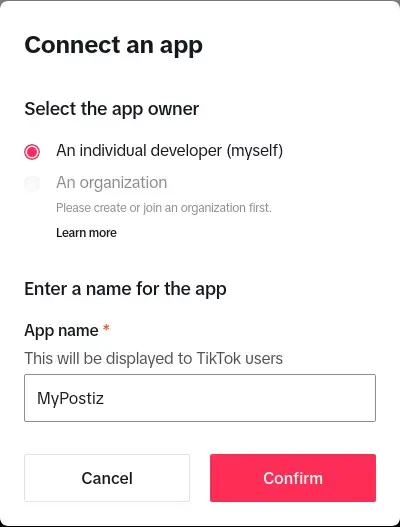
### Create you app[](https://docs.postiz.com/providers/tiktok#create-you-app)

Go here: [https://developers.tiktok.com/apps<span class="nx-sr-only nx-select-none">(opens in a new tab)</span>](https://developers.tiktok.com/apps)

[![tiktok_create_app.webp](https://help.digime.ca/uploads/images/gallery/2024-10/scaled-1680-/E0PmVDQFqyemeQHu-tiktok-create-app.webp)](https://help.digime.ca/uploads/images/gallery/2024-10/E0PmVDQFqyemeQHu-tiktok-create-app.webp)

<div class="nextra-steps nx-ml-4 nx-mb-12 nx-border-l nx-border-gray-200 nx-pl-6 dark:nx-border-neutral-800 [counter-reset:step]" id="bkmrk-app-name%3A%C2%A0mypostiz-r">- **App Name:** `MyPostiz`
- **Redirect URI:** `http://localhost:4200/integrations/social/tiktok`

</div>### Set a TOS and Privacy Policy[](https://docs.postiz.com/providers/tiktok#set-a-tos-and-privacy-policy)

This needs to be on a public domain that you have access to, that is hosted on HTTPS.

Tick "Web" for your platforms.

### Add apps[](https://docs.postiz.com/providers/tiktok#add-apps)

Add the "Login Kit" and "Content Posting API" to your app.

For "Login Kit", set the redirect URI to [http://localhost:4200/integrations/social/tiktok<span class="nx-sr-only nx-select-none">(opens in a new tab)</span>](http://localhost:4200/integrations/social/tiktok)

For Content posting API, enable "Direct Post".

### Add scopes[](https://docs.postiz.com/providers/tiktok#add-scopes)

<div class="nextra-steps nx-ml-4 nx-mb-12 nx-border-l nx-border-gray-200 nx-pl-6 dark:nx-border-neutral-800 [counter-reset:step]" id="bkmrk-user.info.basic-vide">- user.info.basic
- video.create
- video.upload

</div>### Copy your client secret to environment variables[](https://docs.postiz.com/providers/tiktok#copy-your-client-secret-to-environment-variables)

These can be found immediately after registering your application. The client ID is 16 characters long and the secret is 32 characters long.

```
TIKTOK_CLIENT_ID=1234567890123456TIKTOK_CLIENT_SECRET=12345678901234567890123456789012
```

<div class="nextra-steps nx-ml-4 nx-mb-12 nx-border-l nx-border-gray-200 nx-pl-6 dark:nx-border-neutral-800 [counter-reset:step]" id="bkmrk--7"><div class="nextra-code-block nx-relative nx-mt-6 first:nx-mt-0"><div class="nx-opacity-0 nx-transition [div:hover>&]:nx-opacity-100 focus-within:nx-opacity-100 nx-flex nx-gap-1 nx-absolute nx-m-[11px] nx-right-0 nx-top-0" style="box-sizing: border-box; border: 0px solid rgb(229, 231, 235); --tw-border-spacing-x: 0; --tw-border-spacing-y: 0; --tw-translate-x: 0; --tw-translate-y: 0; --tw-rotate: 0; --tw-skew-x: 0; --tw-skew-y: 0; --tw-scale-x: 1; --tw-scale-y: 1; --tw-scroll-snap-strictness: proximity; --tw-ring-offset-width: 0px; --tw-ring-offset-color: #fff; --tw-ring-color: rgba(59,130,246,.5); --tw-ring-offset-shadow: 0 0 transparent; --tw-ring-shadow: 0 0 transparent; --tw-shadow: 0 0 transparent; --tw-shadow-colored: 0 0 transparent; position: absolute; right: 0px; top: 0px; margin: 11px; display: flex; gap: 0.25rem; opacity: 0; transition-property: color, background-color, border-color, text-decoration-color, fill, stroke, opacity, box-shadow, transform, filter, -webkit-backdrop-filter, backdrop-filter; transition-duration: 0.15s; transition-timing-function: cubic-bezier(0.4, 0, 0.2, 1);"><button class="nextra-button nx-transition-all active:nx-opacity-50 nx-bg-primary-700/5 nx-border nx-border-black/5 nx-text-gray-600 hover:nx-text-gray-900 nx-rounded-md nx-p-1.5 dark:nx-bg-primary-300/10 dark:nx-border-white/10 dark:nx-text-gray-400 dark:hover:nx-text-gray-50" tabindex="0" title="Copy code"><svg class="nextra-copy-icon nx-pointer-events-none nx-h-4 nx-w-4" fill="none" height="24" stroke="currentColor" viewbox="0 0 24 24" width="24" xmlns="http://www.w3.org/2000/svg"><rect height="13" rx="2" stroke-linecap="round" stroke-linejoin="round" stroke-width="2" width="13" x="9" y="9"></rect><path d="M5 15H4C2.89543 15 2 14.1046 2 13V4C2 2.89543 2.89543 2 4 2H13C14.1046 2 15 2.89543 15 4V5" stroke-linecap="round" stroke-linejoin="round" stroke-width="2"></path></svg></button></div></div></div>Restart Postiz with the updated environment variables

### Add a TikTok channel in the Postiz web interface[](https://docs.postiz.com/providers/tiktok#add-a-tiktok-channel-in-the-postiz-web-interface)

Go to the Postiz web interface, and click on the "Add Channel" button. Select "TikTok" from the list of available channels. You should be redirected to TikTok to authorize the application.